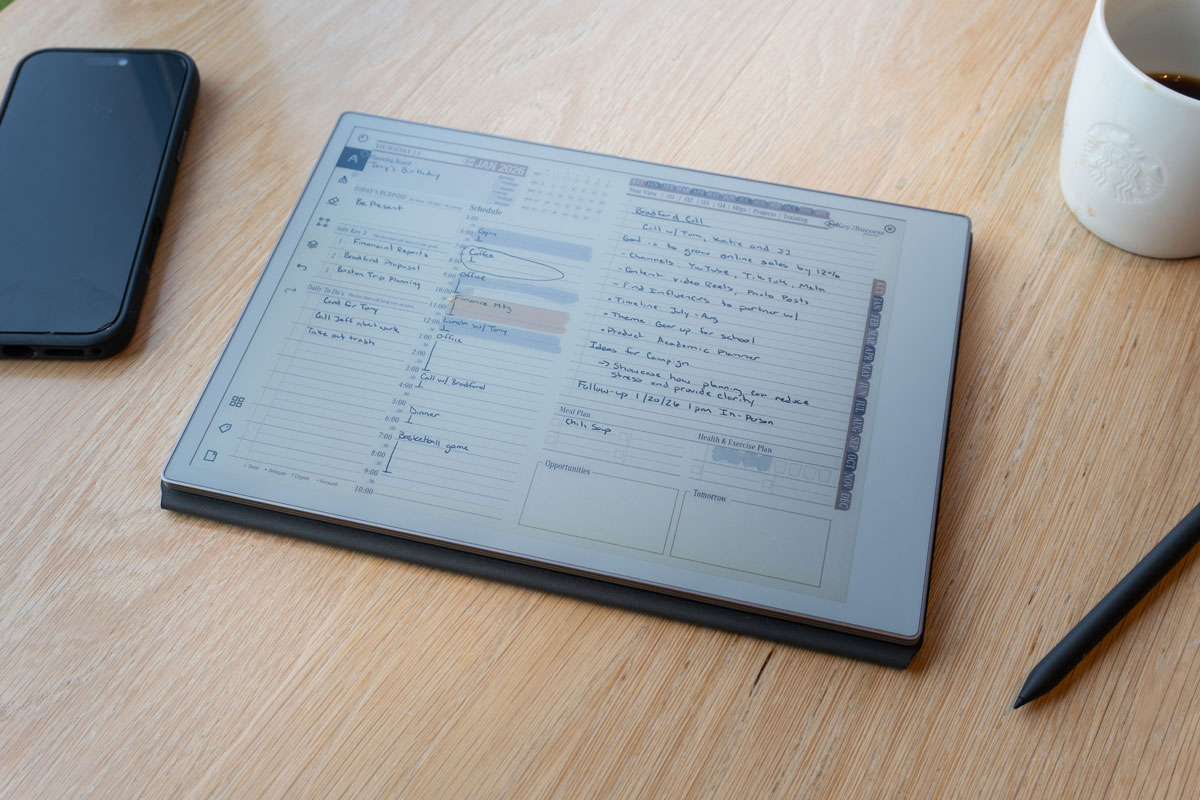
Your reMarkable deserves a system
Four editions. Every reMarkable device. One planning system built around how you actually think — by hand, on paper, without distractions.
lifetime access
More than templates — a complete planning system
The Key2Success Planner is a structured productivity system built as an interactive PDF that installs directly to your reMarkable. No apps. No subscriptions. No cloud. Just your device, your stylus, and a framework that connects your daily tasks to your annual goals.
Every page is hyperlinked so you can tap to jump between daily, weekly, monthly, and annual views in seconds. The system is built around four development areas that give your planning a purpose beyond scheduling.
Works on reMarkable 1, reMarkable 2, Paper Pro, and Paper Pro Move. Installs in under two minutes via USB or the reMarkable desktop app.
The four development areas
Every edition is built around these four pillars — because your reMarkable should help you grow in all directions, not just at work.
Works on all four reMarkable devices
From the original rM1 to the pocket-sized Paper Pro Move — every K2S edition installs natively on all four devices without any additional apps or software.
device image]
device image]
device image]
device image]
A look at every edition's pages
Every edition is built around a distinct set of page templates. Here's what you get inside each one — and what makes it different from the others.
Built for life goals, habits, and daily wellbeing
The Personal Edition gives you a complete daily planning structure alongside dedicated pages for personal growth, wellness, and the four Key2Success development areas. Ideal for students, creatives, and anyone building better routines on their reMarkable.
-
VVision BoardMap your entire year visually. Your north star — the page you return to every week.
-
AAnnual KeysSet your four key development goals across Self, Community, Relationships, and Career for the year ahead.
-
GGoal PlannerBreak any big goal into action steps, timelines, and milestones. One page per goal.
-
IIdeal WeekDesign your perfect weekly routine and use it as your template every Sunday.
-
DDaily PageTime-blocked schedule, priority tasks, and an end-of-day reflection — all in one layout.
-
HHabit Tracker30-day habit grid. Track up to 10 habits at once with visual completion at a glance.
-
QQuarterly ReviewMeasure goal progress every 90 days. Adjust your focus before the next quarter starts.
[Replace with actual K2S Personal Edition page screenshots]
Everything in Personal, plus the tools to manage a demanding career
The Professional Edition adds a full meeting and project management layer on top of Personal's goal and habit system. Built for people who run back-to-back meetings and need their priorities visible every single day.
-
MMeeting NotesStructured layout for agenda, key decisions, and action items — capture everything that matters in the room.
-
PProject TrackerTrack up to 10 active projects with milestones, owners, and status at a glance.
-
WWeekly ReviewA structured Friday ritual: what moved forward, what's stuck, and what gets your focus next week.
-
TTime BlockingDeep work scheduling page. Protect your highest-value hours from meetings and interruptions.
-
CCareer Development PlanAnnual career roadmap with skills to build, goals to hit, and mentors to engage.
-
⇧Priority MatrixUrgent vs. important framework. Use weekly to decide what gets your time and what gets delegated.
[Replace with actual K2S Professional Edition page screenshots]
Built for entrepreneurs and managers running teams and revenue
The Business Edition replaces the weekly rhythm with a 90-day planning cycle and adds the tools to manage people, track numbers, and operate your business — all from one device in your pocket.
-
OOrganizational Operating SystemOne-page business framework — vision, core values, team, targets, and 90-day plan on a single spread.
-
990-Day Planning CycleBreak annual goals into 90-day execution windows. Review, reset, and relaunch every quarter.
-
TTeam & Delegation TrackerWho owns what, by when. Track team commitments and follow up without losing anything.
-
$Revenue & Pipeline OverviewMonthly revenue tracker and sales pipeline view. Keep your business numbers visible at all times.
-
KKPI & OKR TrackerTrack the metrics that actually drive your business forward, not just outputs.
-
CClient & Stakeholder LogKey relationship notes, contact details, and last-action records — all in one place.
[Replace with actual K2S Business Edition page screenshots]
Built for leaders who need to think long, decide clearly, and lead well
The Executive Edition is for people operating at the highest level of responsibility. It adds board-level planning, leadership development, and legacy thinking that doesn't fit in any other edition.
-
SAnnual Strategic PlanMulti-year vision translated into a one-year execution map with quarterly checkpoints.
-
BBoard Prep FrameworkStructured pre-meeting template for board sessions, investor updates, and high-stakes presentations.
-
LLeadership JournalGuided reflection for leaders — decisions made, lessons learned, and how you're showing up for your team.
-
DDecision-Making FrameworkA structured page for high-stakes choices — context, options, criteria, and final decision in one place.
-
VVision & Legacy Planning10-year horizon thinking. What do you want to have built? Who do you want to have developed?
-
MHigh-Stakes Meeting ArchitecturePre-meeting prep, in-room notes, and post-meeting follow-through on one spread.
[Replace with actual K2S Executive Edition page screenshots]
Four editions. Four stages of growth.
Each edition is a distinct planning system, not just a reskinned layout. Pick the one that fits where you are right now.
- ✓Daily + weekly + monthly planning
- ✓Habit tracker & wellness logs
- ✓Annual goal setting
- ✓Gratitude & reflection pages
- ✓Reading & learning tracker
- —Meeting notes system
- —Project tracking
- —Team & delegation
- ✓Daily + weekly planning + review
- ✓Meeting notes & action capture
- ✓Project tracking & milestones
- ✓Deep work time blocking
- ✓Career development plan
- ✓Priority matrix
- —Team & delegation
- —OKR / KPI tracking
- ✓90-day planning cycles
- ✓Weekly overview & review
- ✓Team & delegation tracker
- ✓Revenue & pipeline overview
- ✓KPI & OKR tracking
- ✓Client & stakeholder log
- ★Org. Operating System
- ✓Annual strategic planning
- ✓Quarterly review cycles
- ✓Long-range vision planning
- ★Board prep framework
- ★Leadership journal
- ★Decision-making framework
- ★High-stakes meeting system
✓ Included · — Not included · ★ Exclusive to this edition
Compare all editions in detail →The Complete Key2Success System
Every edition. Every eTile pack. Every update through the year — plus the Decision Journal, insider workshops, and 30 minutes with Branden directly.
- Personal Edition
- Professional Edition
- Business Edition
- Executive Edition
- All eTile packs (+ new releases)
- Key2Success Decision Journal
- PDF & OneNote versions
- Insider workshops
- All year updates
- 30-min 1-on-1 with Branden
Install in under two minutes
No apps required. Your planner lives directly on your reMarkable as an interactive PDF — hyperlinked and ready to use the moment it lands on your device.
Real reMarkable users. Real results.
[TESTIMONIAL — Customer describes how K2S gave their reMarkable a purpose and structure. Mention the specific edition or page that made the biggest difference.]
[TESTIMONIAL — Customer mentions the weekly review habit or how the 90-day planning cycle changed how they run their business. Specific planner section preferred.]
[TESTIMONIAL — Customer talks about how easy installation was or how they use the planner on the Paper Pro Move as their daily carry. Practical and specific.]
eTiles for reMarkable
Reusable digital tile elements that let you build custom layouts directly on your reMarkable. No apps, no imports — drag, copy, and arrange to create exactly the planning surface you need.
- Works natively on reMarkable — no extra software
- Copy & paste into any planner page
- Mix and match to build any layout you need
- Compatible with all four K2S editions
- One-time purchase, unlimited use
- Dark mode and light mode versions available
[Replace with real eTile product grid screenshots]
Everything you want to know before you buy
Questions about which edition fits, how it works on your device, and what happens after you purchase — answered directly.
The Key2Success digital planner is an interactive PDF planning system designed specifically for reMarkable tablets. Created by Branden Bodendorfer, it comes in four editions — Personal, Professional, Business, and Executive — each built around a distinct set of page templates for different life and career stages. The planner installs directly to your reMarkable device with no apps required, works on all reMarkable models, and is a one-time purchase with no subscription.
Yes. The Key2Success digital planner works on every reMarkable device including the reMarkable 1, reMarkable 2, Paper Pro, and the reMarkable Paper Pro Move. All editions are interactive PDFs that install natively without any additional apps or software. The Paper Pro Move's 7.3-inch color display is fully compatible.
Four editions are available. The Personal Edition ($29.99) is built for individuals focused on habits, goals, and daily life structure. The Professional Edition ($49) adds meeting notes, project tracking, and career tools for working professionals. The Business Edition ($99) includes 90-day planning cycles, team management, and revenue tracking for entrepreneurs. The Executive Edition ($149) adds board prep frameworks, leadership journals, and strategic planning for senior leaders. A Complete Edition ($269) bundles all four plus eTiles, the Decision Journal, workshops, and a 30-minute one-on-one with Branden.
Every Key2Success edition is a one-time purchase with lifetime access. There are no annual renewals, no monthly fees, and no cloud subscription required. You purchase the edition, download the PDF, and it lives permanently on your reMarkable device.
After purchasing, download the PDF and transfer it to your reMarkable using a USB cable, the reMarkable desktop app, or by uploading through my.remarkable.com. The entire process takes under two minutes. Once on the device, open the PDF and all navigation hyperlinks work immediately — no setup required. Full step-by-step guides are on the Install Guides page.
Each edition builds on the previous one with additional tools. Personal covers daily planning, habit tracking, goal setting, and personal development. Professional adds meeting notes, project tracking, weekly review, time blocking, and career planning. Business adds 90-day cycles, team delegation, revenue tracking, and the Organizational Operating System. Executive adds annual strategic planning, board prep frameworks, leadership journaling, and vision and legacy planning. See the full breakdown on the Compare Editions page.
The Business Edition is built for entrepreneurs and small business owners. It includes 90-day planning cycles, a one-page Organizational Operating System, team and delegation tracking, revenue and pipeline overview, KPI and OKR tracking, and a client and stakeholder log. Entrepreneurs who also need leadership development tools may want to consider the Executive Edition or the Complete Edition which includes both.
Yes. Because the Key2Success planner is an interactive PDF file, you can transfer it to as many reMarkable devices as you own. Purchase once and install it on your reMarkable 2, Paper Pro, Paper Pro Move, or any combination of devices. There are no device limits or DRM restrictions on the file.
Ready to give your reMarkable a system?
Four editions. Every device. One planning system that grows with you — from personal goals to executive strategy.